
Appearance
Network Settings
Configure all network communication in Menu → Settings → Communication.
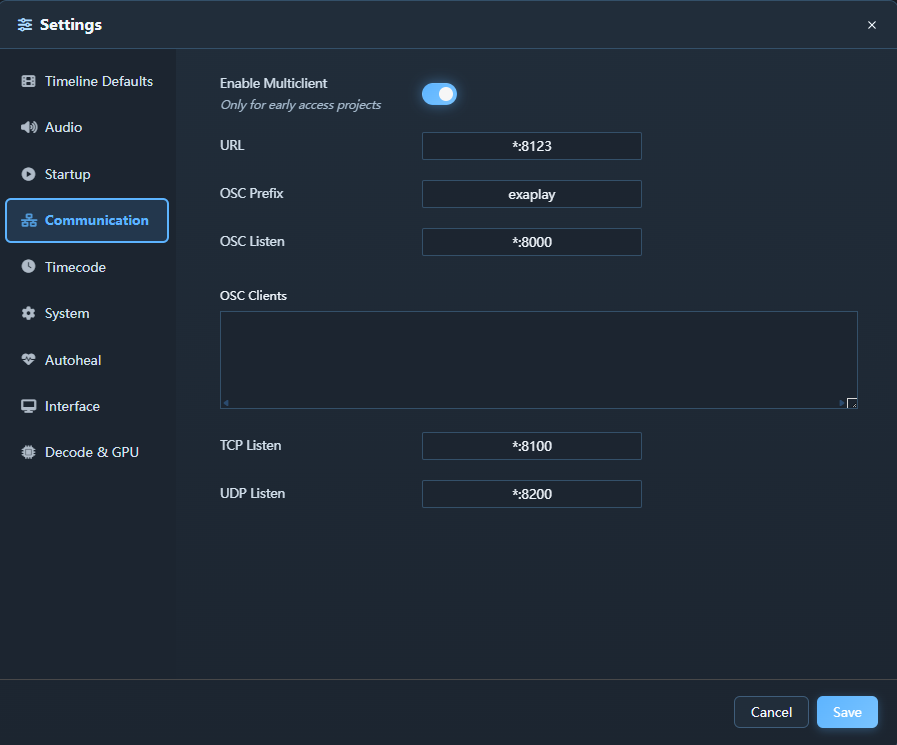
Ports
| Service | Protocol | Default Port | Notes |
|---|---|---|---|
| Web UI / Remote control | HTTP | 8123 | Built-in Exaplay web service |
| Project updates | WS | 8123 | Live project events |
| Performance updates | WS | 8123 | Live diagnostics data |
| Instance Discovery | UDP broadcast | 45454 | Auto-discovery of other Exaplay instances |
| Client Heartbeat | UDP broadcast | 45455 | Multi-client liveness — a master learns its clients' addresses here |
| TCP Command Server | TCP | 8100 | Configurable; see TCP Listen |
| UDP Command Server | UDP | 8200 | Configurable; see UDP Listen |
| OSC Receive | UDP | 8000 | Configurable |
| OSC Send | UDP | — | Destination configured per use |
| ArtNet | UDP | 6454 | Standard ArtNet port — DMX out from Data Tracks; DMX in when Art-Net Input is enabled, timecode in when Timecode Mode is Art-Net (configurable) |
| sACN (E1.31) | UDP | 5568 | DMX in when sACN (E1.31) Input is enabled — multicast 239.255.x.x per mapped universe, or unicast (configurable) |
| NDI Discovery | mDNS | 5353 | Requires multicast |
OSC Settings
Receive
OSC receive is always active — there is no enable switch. The engine listens on the address and port configured in OSC Listen (default *:8000, i.e. all interfaces on port 8000); clear the field to disable OSC input.
Every command addresses a composition as /<prefix>/<composition>/<command>:
<prefix>is set by OSC Prefix (defaultexaplay).<composition>is the composition's ID (comp1,comp2, …) or its name — case-insensitive, with_standing in for spaces (an OSC address cannot contain them):/exaplay/Main_Screen/playstarts the composition named "Main Screen". The composition's Inspector shows a ready-to-copy address in its Show Control section.<command>isplay,pause,stop,cue, … — the full verb list with worked console examples is in the Show Control workflow.
Send
OSC Clients takes one host:port destination per line. The engine streams playback telemetry to every listed client:
| Address | Content |
|---|---|
/<prefix>/<composition>/cueindex, /cueframe, /cuetime, /cueduration, /status | Per-composition playback state (also the stream multiclient render nodes follow) |
/<prefix>/global/show | The loaded show's file name |
/timecode (configurable) | OSC timecode when Timecode Mode is Master (see Timecode Sync) |
Cue scripts can additionally send one-shot OSC messages to any destination — see Show Control.
TCP Settings
The TCP Command Server accepts plain-text comma-delimited commands over a persistent TCP connection. It is designed for show control systems, touch panels, and other devices that cannot easily send HTTP or OSC.
| Setting | Description |
|---|---|
| TCP Listen | Address and port to listen on, one entry per line (e.g. *:8100 to listen on all interfaces on port 8100) |
Leave the field empty to disable TCP control.
Use this for external show-control systems that send plain-text commands over a persistent connection.
UDP Settings
The UDP Command Server accepts the same comma-delimited commands as the TCP server, but over UDP datagrams. Each command arrives as a single datagram; the engine sends the complete response back to the sender as a single reply datagram.
| Setting | Description |
|---|---|
| UDP Listen | Address and port to listen on, one entry per line (e.g. *:8200 to listen on all interfaces on port 8200) |
Leave the field empty to disable UDP control.
Use this for simple one-shot commands sent as individual UDP packets.
ArtNet Settings
| Setting | Description |
|---|---|
| Art-Net Input | Opens the Art-Net listening socket so a lighting console can drive playback over DMX. Off by default — nothing is opened while it is off. Takes effect on save, no restart. |
| Art-Net Port | UDP port to listen on, 6454 by default. Change it only when another Art-Net node runs on the same machine. Also the port Art-Net Timecode mode listens on. |
| sACN (E1.31) Input | Opens the sACN listening socket for DMX from an E1.31 console. Off by default. Exaplay joins the multicast group of every universe an sACN mapping names; unicast works too. |
| sACN Port | UDP port to listen on, 5568 by default (the E1.31 standard port). |
The channel-to-action mappings are edited in the table under these rows and are stored in the show, not in this machine's configuration — see DMX input.
ArtNet timecode (OpTimeCode) as a sync source is enabled under Settings → Timecode → Timecode Mode → Art-Net Timecode (slave), not here; that mode opens the Art-Net port by itself (see Timecode Sync).
Remote Access
The web UI is served from the engine's HTTP server and accessible from any browser on the local network at http://<engine-ip>:8123/.
Security note: There is no built-in authentication. Restrict access using your network firewall or a VPN. Do not expose port
8123to the public internet.
Firewall Configuration
Open the following inbound rules on the Exaplay machine's Windows Firewall:
TCP  8123     Exaplay Web UI & API
UDP  45454    Instance Discovery (auto-discovery of other Exaplay instances)
UDP  45455    Client Heartbeat (multi-client; without it the master never
              drives its clients' playback)
TCP  8100     TCP Command Server
UDP  8200     UDP Command Server
UDP  8000     OSC Receive
UDP  5353     NDI Discovery (mDNS)
TCP 5960+ NDI DataArt-Net (UDP)
Data Tracks send DMX to lighting fixtures from a sending socket, configured per track (destination address and port 6454 by default) — no inbound rule is needed for that. With Art-Net Input enabled (Settings → Communication) or Timecode Mode set to Art-Net, Exaplay also listens on UDP 6454 (or the configured port); with sACN (E1.31) Input enabled it listens on UDP 5568. Add inbound rules for the ones you use:
UDP  6454     Art-Net DMX / timecode input (Art-Net Input or Art-Net Timecode mode)
UDP 5568 sACN (E1.31) DMX input (only when sACN Input is enabled)TCP, UDP and OSC remain the command ports for other show-control gear (see Art-Net & DMX).