
Appearance
ArtNet & DMX
Exaplay 3 speaks DMX over the network in both directions: it transmits DMX512 lighting values over Art-Net from timeline-animated Data Tracks (direct control of fixtures, dimmers, moving lights — the first part of this page), and it receives DMX from a lighting console over Art-Net or sACN (E1.31) so the desk can drive playback — see DMX input below.
Overview
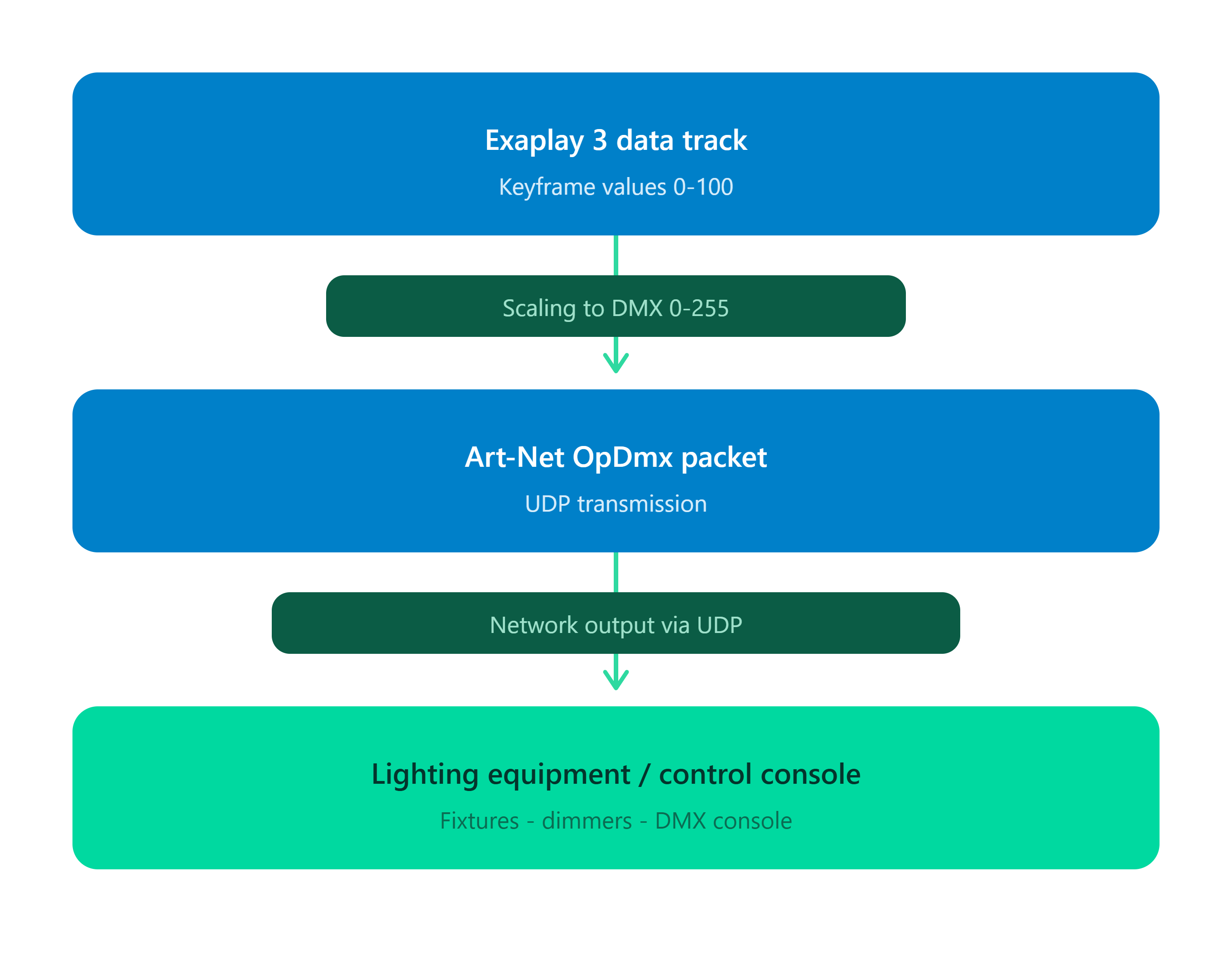
Art-Net is an Ethernet-based protocol that encapsulates DMX512 (the industry-standard lighting control protocol). Any Art-Net-capable lighting console, fixture, or media server on the same network can receive values from Exaplay.
Prerequisites
- A network connection between the Exaplay machine and the Art-Net device
- The Art-Net device configured to receive on the correct universe
- Both devices on the same subnet (or a network that passes Art-Net UDP broadcasts)
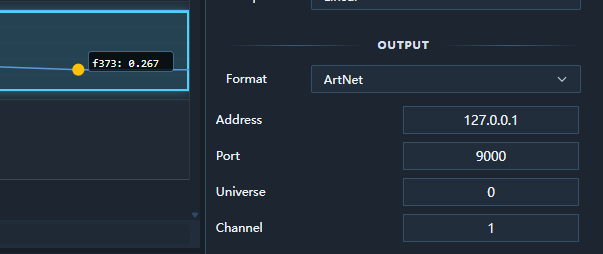
Setting Up a Data Track with ArtNet Output
Step 1 — Create the Data Track
- In the Sub-header, switch to the Data panel.
- Click + Data Track.
- Set Output Type to
ArtNet.
Step 2 — Configure ArtNet
| Field | Description | Valid range |
|---|---|---|
| Universe | Art-Net universe number | 0–32767 |
| Channel | DMX channel within the universe | 1–512 |
| Destination IP | Target Art-Net device IP (or 255.255.255.255 for broadcast) | Any IPv4 |
Tip: Most lighting fixtures start on Universe 0. Check your fixture's DMX address map.
Step 3 — Add Keyframes
Set keyframe values between the track's Min and Max range. Exaplay automatically scales:
Track value 0.0  →  DMX 0    (off)
Track value 0.5  →  DMX 127  (50 %)
Track value 1.0 → DMX 255 (full)Step 4 — Play
Press Play. Exaplay calculates the interpolated track value for each frame and transmits an Art-Net OpDmx packet to the configured destination.
Art-Net Packet Format
Exaplay sends standard Art-Net 4 OpDmx packets:
Bytes  0–7   "Art-Net\0"  (8 bytes, ASCII + null)
Bytes  8–9   OpCode 0x5000  (OpDmx, little-endian)
Bytes 10–11  Protocol version 14  (big-endian)
Byte   12    Sequence number
Byte   13    Physical port
Bytes 14–15  Universe (little-endian)
Bytes 16–17  DMX data length (big-endian, must be even)
Bytes 18+ DMX data (up to 512 bytes)Multi-Universe and Multi-Channel
You can have multiple Data Tracks, each targeting a different universe/channel combination. All tracks run simultaneously:
Data Track "Dimmer 1"    → Universe 0, Channel 1
Data Track "Red"         → Universe 0, Channel 2
Data Track "Green"       → Universe 0, Channel 3
Data Track "Blue"        → Universe 0, Channel 4
Data Track "Moving Head" → Universe 1, Channel 1Broadcast vs Unicast
| Mode | Destination IP | Use when |
|---|---|---|
| Broadcast | 255.255.255.255 | Quick setup; all Art-Net devices on the subnet receive the packet |
| Unicast | Specific IP (e.g. 192.168.1.50) | Reduces network load; targets one specific device |
For shows with many DMX universes, use unicast to avoid flooding the network.
Value Clamping
Values outside the track's Min–Max range are clamped before scaling:
- A value below Min is treated as Min (DMX 0)
- A value above Max is treated as Max (DMX 255)
Combining with OSC and UDP
A single Data Track outputs to one protocol. To drive both a lighting console via Art-Net and a media server via OSC with the same keyframe animation:
- Create two Data Tracks with identical keyframes.
- Set one to
ArtNetoutput and one toOSCoutput. - Both transmit in sync during playback.
Troubleshooting
| Problem | Solution |
|---|---|
| Fixture does not respond | Verify universe and channel match the fixture's DMX address |
| Intermittent control | Switch from broadcast to unicast; reduce network congestion |
| Values too high/low | Check Min/Max track range vs expected DMX scaling |
| No packets transmitted | Confirm the Data Track is on a playing composition; verify destination IP is reachable |
Fixture profiles and library
Patch a fixture
- Add or select a Data Track in the Timeline and set Output → Format to ArtNet.
- Select Fixture library…, next to the ArtNet universe/channel controls.
- Choose a profile and mode, an Art-Net universe (
0–32767), a one-based starting DMX address (1–512), and the destination IP. - Review the footprint and parameter-to-channel preview. Exaplay rejects patches that cross channel 512 and warns when an existing ArtNet Data Track already uses a channel in the footprint.
- Select Generate / bind tracks.
Name binding is off by default. Turn it on to reuse Data Tracks you already authored: a track whose name matches a profile parameter (case-insensitively) is re-pointed at that parameter's channel instead of a new track being created. The modal lists every track that will be rewritten before you confirm, so you can see what binding is about to touch.
Binding only ever considers tracks that are already ArtNet output, or that have no output format set at all. A track sending OSC, TCP, UDP, or driving a Control Panel is never converted, even when its name matches — a Dimmer on another protocol is a different thing that happens to share a name. Tracks outside the match set are neither deleted nor modified.
An overlap warning is intentionally not an automatic overwrite: it lets operators decide whether two tracks should share a channel.
Every generated track receives the profile parameter's physical range and default keyframe. Art-Net scales that range to one DMX byte. Fine channels in a 16-bit parameter are represented by a separate named Data Track and retain their coarse/fine relationship as profile metadata; operators can animate the fine track independently.
If a patch fails part way through — an engine round-trip is refused, say — the tracks created before the failure remain and the error names the parameter that stopped it. Re-running the patch with binding enabled picks up where it left off rather than duplicating what already exists.
Native profile format
Native profiles are small JSON objects (or arrays of objects). The canonical JSON Schema is at exaplay_frontend/src/fixtures/fixture-profile.schema.json, and the runtime validator enforces the same rules. Offsets are zero-based relative to the fixture's one-based starting address, and must be real JSON numbers — a quoted "offset": "3" is rejected rather than silently patched to the wrong channel.
json
{
  "id": "my-device-2ch",
  "manufacturer": "My organisation",
  "model": "Custom device",
  "mode": "2 channel",
  "channelCount": 2,
  "parameters": [
    {
      "name": "Dimmer",
      "offset": 0,
      "range": { "min": 0, "max": 100 },
      "default": 0,
      "unit": "%"
    },
    {
      "name": "Dimmer Fine",
      "offset": 1,
      "range": { "min": 0, "max": 255 },
      "default": 0,
      "unit": "DMX",
      "resolution": "fine",
      "coarseParameter": "Dimmer"
    }
  ]
}Use Import native JSON / GDTF XML… in the fixture dialog. Validation requires manufacturer, model, mode, channel count, unique parameter names, numeric offsets within the footprint, numeric ranges/defaults, units, and valid coarse/fine references. Keep the native format for custom hardware and for semantics that cannot be mapped reliably from GDTF.
GDTF import
GDTF packages are ZIP archives. The browser build deliberately adds no general ZIP dependency: extract Description.xml from a trusted .gdtf file and import that XML. The practical importer creates a profile for each straightforward DMXMode, maps DMXChannel Offset values, and creates separate fine tracks for multi-byte offsets. Where two channels in one mode carry the same GDTF attribute, the imported parameter names are disambiguated by their DMX offset rather than the mode being discarded.
A mode that still cannot be represented is reported by name with the reason it was rejected, so an import that yields nothing tells you why instead of failing silently.
GDTF can express channel functions, geometry, switching channels, relations, and physical conversions that do not reduce safely to a single Data Track. Review imported names, defaults, and channel preview before patching; use a native profile when the mapping is incomplete. Media and geometry in a GDTF archive are not imported.
Included profiles and licensing
The bundled entries are clearly labelled Generic test profile: a one-channel dimmer, a five-channel RGB/dimmer/strobe device, and a seven-channel 16-bit moving-head example. They are synthetic test layouts, not manufacturer definitions. Exaplay does not redistribute third-party fixture definitions unless their licensing has been confirmed; import a properly licensed GDTF or author a native JSON profile for production fixtures.
Addressing notes
- Art-Net universes are numbered
0–32767; DMX channels are numbered1–512in the UI. - A fixture must fit completely in one universe. Split it into explicit profiles if custom hardware spans universes.
- Multiple Data Tracks may intentionally drive the same channel. Exaplay reports the overlap but does not silently delete the older track.
- Generated tracks default to 44 Hz and port 6454. Raw tracks retain their previously authored rate, address, universe, and channel.
Art-Net DMX input — console drives Exaplay
Everything above is output: Exaplay driving lighting fixtures. The reverse direction is available too: patch Exaplay on the lighting console as a DMX fixture, and its faders and buttons play, stop, cue and seek the show.
Enable the input
- Open Menu → Settings → Communication.
- Switch on the protocol the console speaks — both may be on at once:
- Art-Net Input with Art-Net Port (
6454by default — the standard port; change it only when another Art-Net node runs on the same machine). - sACN (E1.31) Input with sACN Port (
5568). Exaplay joins the multicast group of every universe your sACN mappings name (239.255.<hi>.<lo>), so a desk transmitting multicast is heard without any address setup; unicast to this machine works too. On a machine with several network adapters the multicast join lands on the default one — use unicast there.
- Art-Net Input with Art-Net Port (
- Save. The listener starts immediately, no engine restart is needed, and the status line under the mapping table reports what each protocol sees: Art-Net: listening on UDP 6454, no DMX yet · sACN: listening on UDP 5568, 2 multicast groups joined, no DMX yet → Art-Net: receiving DMX from 10.0.0.20 U0 (Art-Net) · 1 source.
The switches and ports are per machine (config.comm). The mappings below are part of the show (.vpp): they name compositions, which are the same on every machine of a multiclient rig.
Multiclient
Patch the console to the master. A client-role machine listens but never acts on DMX — the master's playback stream already drives it — and the panel says so. Editing mappings while the fleet is in Play mode is refused like any other show edit; switch the Network view to Edit mode first.
Map channels to actions
Each row of the Art-Net DMX input mappings table reads one DMX channel and runs one action:
| Column | Meaning |
|---|---|
| Protocol | Art-Net or sACN (E1.31) — the wire this row listens on. Rows saved before sACN existed are Art-Net. |
| Source | Sender IP to accept, or empty for any console on the network. |
| Universe / Channel | The protocol's own universe numbering — Art-Net Port-Address 0–32767 (zero-based, exactly as the console patches it), sACN universe 1–63999 — and DMX channel 1–512. An optional fine channel makes a 16-bit control (coarse, then fine). |
| Mode | momentary — fires on the rising (or falling) edge past the threshold, once per press. toggle — every press flips between the output minimum and maximum. range / continuous — the scaled value is sent whenever it moves. |
| Threshold | 0–1 of the channel's range; a momentary button must send 0 released / 255 pressed. |
| Scale | Input range → output range, with Invert. 0–1 → 0–1 passes the fader through. |
| Loss | For continuous: when the console stops transmitting, hold last or restore default (the output minimum). |
| Action / target | What to run, and on which composition. |
| Live | The value the engine is currently reading for this row, ● while it is above the threshold. |
Actions:
| Action | Sends | Notes |
|---|---|---|
| Play / Pause / Stop / Next / Previous | the transport verb | one press = one command |
| Cue Go | cue.go | the composition's next cue |
| Cue select | cue.go=<value> | the scaled value is the cue number — with the fixture's 1–256 range, DMX 0 is cue 1 |
| Show Mode | rig-wide show mode on/off | needs no composition |
| Seek | set:time=<value × duration> | the value is a fraction of the composition's duration (0–1); a composition without a known duration is not seeked |
| Numeric property | set:<path>=<value> | any numeric property, e.g. audio.volume with an output range of 0–100 |
Learn on a row arms the engine: move exactly one control on the console and the row takes that source, universe and channel. Small jitter (below 8 DMX steps) is ignored, so a wobbling fader does not get learned by accident.
Patch it as one fixture
Patch Exaplay Control fixture… adds the whole 12-channel Exaplay Control layout on the protocol, universe and start address of your choice, all rows on the chosen composition:
| Channel | Function | Mode |
|---|---|---|
| 1 | Play | momentary |
| 2 | Pause | momentary |
| 3 | Stop | momentary |
| 4 | Next | momentary |
| 5 | Previous | momentary |
| 6 | Cue Go | momentary |
| 7 | Cue Selection | range, 0–255 → cue 1–256 |
| 8 | Show Mode | toggle |
| 9 + 10 | Timeline Seek (16-bit) | continuous, hold on loss |
| 11 + 12 | Property 1 (16-bit) | continuous — set the property path on the row |
Patch the same 12-channel fixture on the console at the same address (a generic 12-channel "dimmer" personality is enough: momentary channels must send 0 released / 255 pressed). fixtures/artnet/ in the source tree holds the same layout as a manifest and a GDTF source (python fixtures/artnet/generate_gdtf.py builds the archive); it is a vendor-neutral convenience file, not a manufacturer-certified personality.
Behaviour worth knowing
- A button is only ever fired by a change the console sends. When a console appears, disappears or restarts, the first frame it sends establishes the baseline and fires nothing — a fixture that comes up with a channel at 255 does not press Play.
- Moving faders never flood the engine: a
continuous/rangerow sends only when its scaled value moved, at most 20 times a second, and the last position always lands. - Every packet is a Monitor event (ArtNet DMX in, folded to ten lines a second); a new or lost source is logged there too.
- DMX is ignored while a project is loading — the stream re-delivers state within a few frames once the show is up.
- sACN priority (E1.31 §6.2.3): when two sources send the same universe, the higher priority wins; a lower-priority source is tracked and takes over the moment the higher one stops or sends stream terminated. Preview-data packets are never acted on; only start code 0 (dimmer data) is read.
Troubleshooting
| Problem | Check |
|---|---|
| Status stays no DMX yet | Console → Exaplay on the same subnet, Art-Net broadcast or unicast to this machine's IP, universe patched as a zero-based Port-Address, Windows Firewall allowing inbound UDP 6454 (Art-Net) / 5568 (sACN). |
| sACN: 0 multicast groups joined | No enabled row has protocol sACN yet — the groups follow the mappings. With rows present but still no data, the desk may be sending on a different adapter than Windows' default: switch it to unicast to this machine. |
| port … could not be opened | Another Art-Net application (a visualiser, an output node) owns the port on this machine — close it or move Exaplay's port. sACN shares its port with other E1.31 receivers, so that one only fails when a receiver holds it exclusively. |
| Live shows a value but nothing happens | The row has no composition, or the mode is momentary and the button never crosses the threshold (check the Live ● dot). |
| Play works, Cue select fires the wrong cue | Cue numbers start at 1: use an output range of 1–256, as the fixture does. |
| The panel says this machine is a CLIENT | Patch the master. |
Art-Net timecode
OpTimeCode is playback synchronization, not DMX fixture control: set Settings → Timecode → Timecode Mode to Art-Net Timecode (slave) and compositions in timecode mode follow the desk's TC — see Timecode Sync. In every other mode incoming Art-Net timecode is shown as status only.