
Appearance
Network Settings
Configure all network communication in Menu → Settings → Communication.
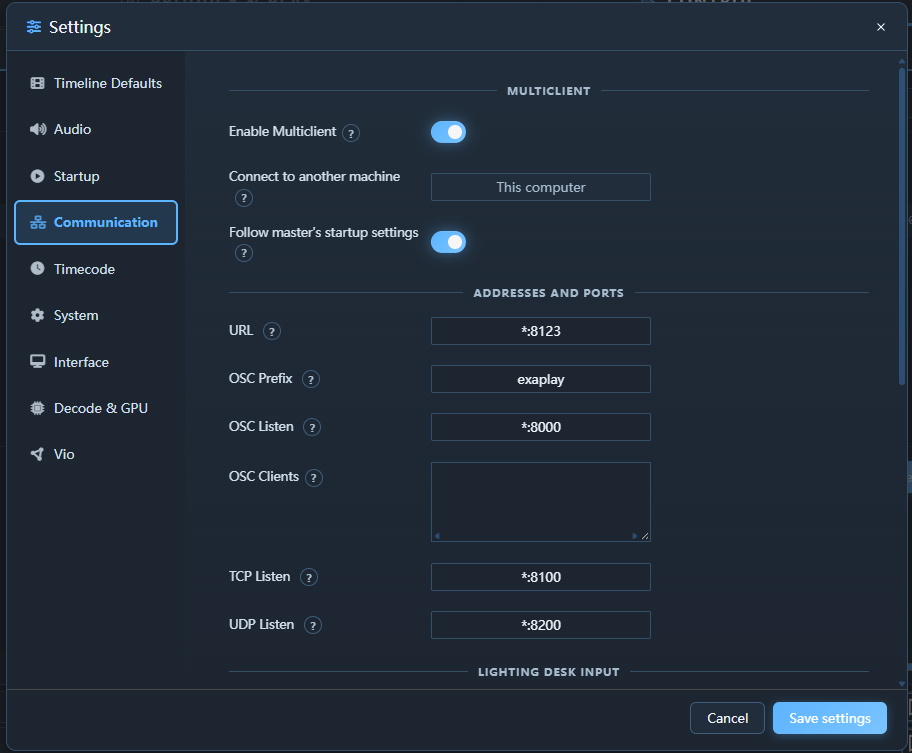
Ports
| Service | Protocol | Default Port | Notes |
|---|---|---|---|
| Web UI / Remote control | HTTP | 8123 | Built-in Exaplay web service |
| Project updates | WS | 8123 | Live project events |
| Performance updates | WS | 8123 | Live diagnostics data |
| Instance Discovery | UDP broadcast | 45454 | Auto-discovery of other Exaplay instances |
| Client Heartbeat | UDP broadcast | 45455 | Multi-client liveness — a master learns its clients' addresses here |
| TCP Command Server | TCP | 8100 | Configurable; see TCP Listen |
| UDP Command Server | UDP | 8200 | Configurable; see UDP Listen |
| OSC Receive | UDP | 8000 | Configurable |
| OSC Send | UDP | — | Destination configured per use |
| ArtNet | UDP | 6454 | Standard ArtNet port — DMX out from Data Tracks; DMX in when Art-Net Input is enabled, timecode in when Timecode Mode is Art-Net (configurable) |
| sACN (E1.31) | UDP | 5568 | DMX in when sACN (E1.31) Input is enabled — multicast 239.255.x.x per mapped universe, or unicast (configurable) |
| PatternGenerator | UDP | 12000 | Always listening — test-pattern control used by ProjectionTools |
| NDI Discovery | mDNS | 5353 | Requires multicast |
Security
The control ports have no authentication. Anyone who can reach the HTTP port can use every function of the web interface — start and stop the show, read and change the project (including stored PJLink passwords), manage files on the media drives, restart Exaplay or shut the machine down. TCP, UDP and OSC accept every command from any sender.
- Run Exaplay on an isolated show network, not on an office or guest network.
- Use the Windows firewall to allow the ports above only from the show network (restrict remote addresses on the rules).
- Bind a listener to one network interface instead of
*where the machine has several (e.g.192.168.10.5:8100in TCP Listen).
Several Network Adapters
On a PC with more than one network adapter (a control network, an NDI/media network, a VPN), pick the adapter Exaplay works on with the URL field: enter that adapter's IP address instead of *, for example 192.168.10.5:8123, and restart Exaplay.
That one entry does two things:
- the web interface and the REST API are served on that address only (and on
localhoston the machine itself); - other Exaplay PCs find this machine only on that network — discovery and the multi-client heartbeat are sent on that adapter alone, so the master, playback sync and Copy Files all use this address. In the Network tab the "Active communication path" dot then sits on that adapter.
With * (the default) Exaplay announces itself on every network. If the address you entered is not on any adapter yet (cable out, DHCP has not answered), Exaplay waits until it appears instead of announcing itself somewhere else.
Set OSC Listen, TCP Listen and UDP Listen to the same IP if show control should arrive only on that network too. Which network NDI uses is set in NDI's own tools (NDI Access Manager), not in Exaplay.
OSC Settings
Receive
OSC receive is always active — there is no enable switch. The engine listens on the address and port configured in OSC Listen (default *:8000, i.e. all interfaces on port 8000); clear the field to disable OSC input.
Every command addresses a composition as /<prefix>/<composition>/<command>:
<prefix>is set by OSC Prefix (defaultexaplay).<composition>is the composition's ID (comp1,comp2, …) or its name — case-insensitive, with_standing in for spaces (an OSC address cannot contain them):/exaplay/Main_Screen/playstarts the composition named "Main Screen". The composition's Inspector shows a ready-to-copy address in its Show Control section.<command>isplay,pause,stop,cue, … — the full address list is in the OSC Reference, worked console examples in the Show Control workflow.
Send
OSC Clients takes one host:port destination per line (a $Name from System → Global Variables works too). The engine streams its playback telemetry to every listed client — the same stream multi-client render nodes follow, about 125 messages per second per composition, whether or not anything plays:
| Address | Content |
|---|---|
<prefix>/<composition ID>/cueindex (i), cueframe (i), cuetime (d seconds — a 64-bit double, or f while any client in the fleet runs a build that cannot read d — then the sample's age, f), cueduration (f), status (i: 1 play, 2 pause, 0 stop) | Per-composition playback state |
<prefix>/global/show (s) | The loaded show's file name, about once a second |
<prefix>/global/… | Further fleet state (show mode, blank, identify, …) on a multi-client master |
/timecode (configurable) | OSC timecode when Timecode Mode is Master (see Timecode Sync) |
The telemetry addresses are sent without a leading slash and use the composition's ID, never its name. They are Exaplay's own sync channel rather than a stable integration API.
Cue scripts can additionally send one-shot OSC messages to any destination — see Show Control.
TCP Settings
The TCP Command Server accepts plain-text commands — dotted (comp1.play) or the classic comma form — over a persistent TCP connection. It is designed for show control systems, touch panels, and other devices that cannot easily send HTTP or OSC.
| Setting | Description |
|---|---|
| TCP Listen | Address and port to listen on (e.g. *:8100 for every interface on port 8100). A change re-binds as soon as Settings is saved |
Leave the field empty to disable TCP control.
Use this for external show-control systems that send plain-text commands over a persistent connection.
UDP Settings
The UDP Command Server accepts the same commands as the TCP server, but over UDP datagrams. Each command arrives as a single datagram; the engine sends the complete response back to the sender as a single reply datagram.
| Setting | Description |
|---|---|
| UDP Listen | Address and port to listen on (e.g. *:8200 for every interface on port 8200). A change re-binds as soon as Settings is saved |
Leave the field empty to disable UDP control.
Use this for simple one-shot commands sent as individual UDP packets.
ArtNet Settings
| Setting | Description |
|---|---|
| Art-Net Input | Opens the Art-Net listening socket so a lighting console can drive playback over DMX. Off by default — nothing is opened while it is off. Takes effect on save, no restart. |
| Art-Net Port | UDP port to listen on, 6454 by default. Change it only when another Art-Net node runs on the same machine. Also the port Art-Net Timecode mode listens on. |
| sACN (E1.31) Input | Opens the sACN listening socket for DMX from an E1.31 console. Off by default. Exaplay joins the multicast group of every universe an sACN mapping names; unicast works too. |
| sACN Port | UDP port to listen on, 5568 by default (the E1.31 standard port). |
What each channel does is set in Control → Inputs → Lighting desk (DMX), not here; those mappings are stored in the show, not in this machine's configuration — see DMX input.
ArtNet timecode (OpTimeCode) as a sync source is enabled under Settings → Timecode → Timecode Mode → Receive Art-Net timecode, not here; that mode opens the Art-Net port by itself (see Timecode Sync).
Remote Access
The web UI is served from the engine's HTTP server and accessible from any browser on the local network at http://<engine-ip>:8123/.
Security note: There is no built-in authentication — see Security. Restrict access using your network firewall or a VPN. Do not expose port
8123to the public internet.
Firewall Configuration
Open the following inbound rules on the Exaplay machine's Windows Firewall:
TCP  8123     Exaplay Web UI & API
TCP  8124     Exaplay Service (watchdog, software updates, multi-client)
UDP  45454    Instance Discovery (auto-discovery of other Exaplay instances)
UDP  45455    Client Heartbeat (multi-client; without it the master never
              drives its clients' playback)
TCP  8100     TCP Command Server
UDP  8200     UDP Command Server
UDP  8000     OSC Receive
UDP  12000    PatternGenerator (ProjectionTools)
UDP  5353     NDI Discovery (mDNS)
TCP 5960+ NDI DataArt-Net (UDP)
Data Tracks send DMX to lighting fixtures from a sending socket, configured per track (destination address and port 6454 by default) — no inbound rule is needed for that. With Art-Net Input enabled (Settings → Communication) or Timecode Mode set to Art-Net, Exaplay also listens on UDP 6454 (or the configured port); with sACN (E1.31) Input enabled it listens on UDP 5568. Add inbound rules for the ones you use:
UDP  6454     Art-Net DMX / timecode input (Art-Net Input or Art-Net Timecode mode)
UDP 5568 sACN (E1.31) DMX input (only when sACN Input is enabled)TCP, UDP and OSC remain the command ports for other show-control gear (see Art-Net & DMX).