
Appearance
Network Settings
Configure all network communication in Config → Network.
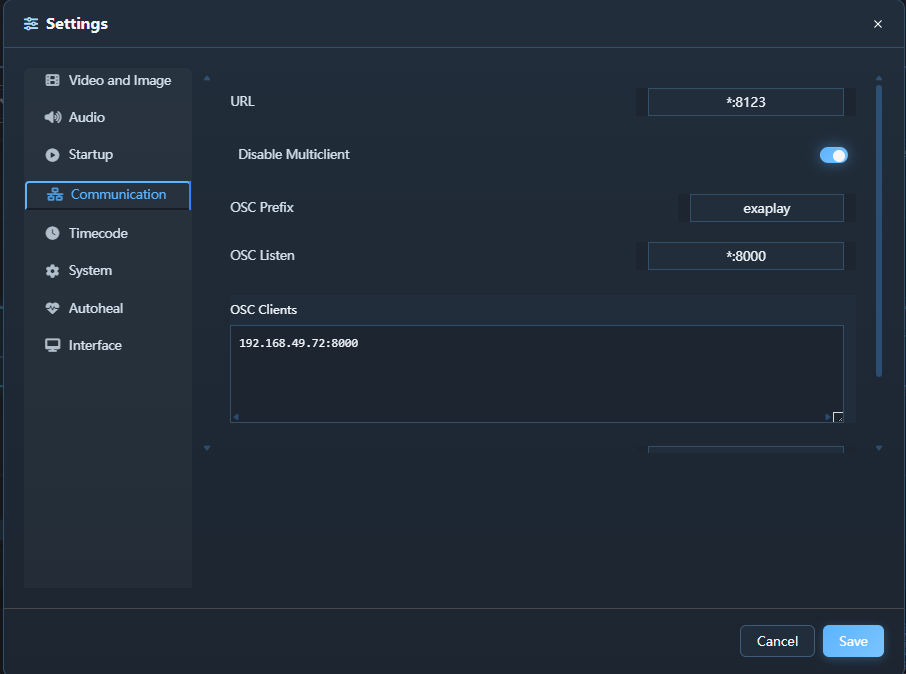
Ports
| Service | Protocol | Default Port | Notes |
|---|---|---|---|
| Web UI / Remote control | HTTP | 8123 | Built-in Exaplay web service |
| Project updates | WS | 8123 | Live project events |
| Performance updates | WS | 8123 | Live diagnostics data |
| Effects service | HTTP/WS | 3001 | Live effects communication |
| Instance Discovery | UDP broadcast | 45454 | Auto-discovery of other Exaplay instances |
| TCP Command Server | TCP | 8100 | Configurable; see TCP Listen |
| UDP Command Server | UDP | 8200 | Configurable; see UDP Listen |
| OSC Receive | UDP | 8000 | Configurable |
| OSC Send | UDP | — | Destination configured per use |
| ArtNet | UDP | 6454 | Standard ArtNet port |
| NDI Discovery | mDNS | 5353 | Requires multicast |
OSC Settings
Receive
Enable Receive OSC and set the Listen Port (default 8000). Exaplay 3 responds to the following OSC messages:
| Address | Arguments | Action |
|---|---|---|
/play | — | Start playback |
/stop | — | Stop playback |
/pause | — | Pause playback |
/goto | f timecode | Jump to timecode (seconds) |
/cue | s name | Fire cue by name |
/cue | i number | Fire cue by number |
/volume | f level | Set master volume (0.0–1.0) |
Send
Enable Send OSC and enter the Destination IP and Port. Exaplay 3 sends:
| Address | When |
|---|---|
/timecode | Every frame during playback |
/cue/active | When a cue becomes active |
/status | On play, stop, pause events |
TCP Settings
The TCP Command Server accepts plain-text comma-delimited commands over a persistent TCP connection. It is designed for show control systems, touch panels, and other devices that cannot easily send HTTP or OSC.
| Setting | Description |
|---|---|
| TCP Listen | Address and port to listen on, one entry per line (e.g. *:8100 to listen on all interfaces on port 8100) |
Leave the field empty to disable TCP control.
Use this for external show-control systems that send plain-text commands over a persistent connection.
UDP Settings
The UDP Command Server accepts the same comma-delimited commands as the TCP server, but over UDP datagrams. Each command arrives as a single datagram; the engine sends the complete response back to the sender as a single reply datagram.
| Setting | Description |
|---|---|
| UDP Listen | Address and port to listen on, one entry per line (e.g. *:8200 to listen on all interfaces on port 8200) |
Leave the field empty to disable UDP control.
Use this for simple one-shot commands sent as individual UDP packets.
ArtNet Settings
Not available in this build. ArtNet timecode receive is not yet wired up — there is no ArtNet settings panel and no Receive ArtNet TC control. Use OSC, LTC, or MTC for external timecode sync (see Timecode & ArtNet Sync). When implemented, the planned Receive ArtNet TC toggle will listen for ArtNet timecode (OpTimeCode) on the network. Note that ArtNet timecode packets carry no universe, and the receiver listens on all network interfaces — so there is no universe or network-adapter setting to configure.
Remote Access
The web UI is served from the engine's HTTP server and accessible from any browser on the local network at http://<engine-ip>:8123/.
Security note: There is no built-in authentication. Restrict access using your network firewall or a VPN. Do not expose port
8123or3001to the public internet.
Firewall Configuration
Open the following inbound rules on the Exaplay machine's Windows Firewall:
TCP  8123     Exaplay Web UI & API
TCP  3001     Effects Server
UDP  45454    Instance Discovery (auto-discovery of other Exaplay instances)
TCP  8100     TCP Command Server
UDP  8200     UDP Command Server
UDP  8000     OSC Receive
UDP  6454     ArtNet
UDP  5353     NDI Discovery (mDNS)
TCP  5960+    NDI Data