
Appearance
Inspector Panel
The Inspector panel displays and edits the properties of whatever is currently selected — a clip on the timeline, a screen output, or a cue.
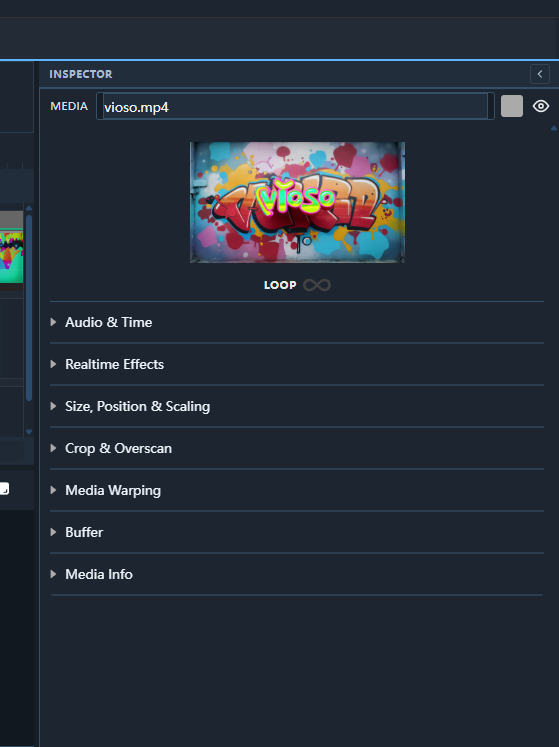
Opening the Inspector
The Inspector is always visible on the right side of the Main Editor. Click any item in the composition canvas or timeline to populate it.
Sections
Media Properties (clip selected)
| Property | Description |
|---|---|
| Name | Display name of the clip |
| Source | File path or live-input reference |
| Start / End | In and out points within the source file |
| Loop | Once, Loop, ∞ Infinite |
| Volume | Audio gain (dB), per-clip |
| In Transition | Crossfade, cut, wipe — with duration |
| Out Transition | Same options as In Transition |
| Effects | List of applied GPU effects with per-effect parameters |
Layer Properties (layer selected)
| Property | Description |
|---|---|
| Position | X, Y offset on screen (pixels or %) |
| Size | Width and Height |
| Opacity | 0–100 % |
| Blend mode | Normal, Add, Multiply, Screen, etc. |
| Z-order | Stacking order buttons (bring to front / send to back) |
Screen Properties (screen tab selected)
| Property | Description |
|---|---|
| Output | Physical display assignment |
| Resolution | Width × Height |
| Refresh rate | Target FPS |
| Background colour | Colour shown when no media is playing |
Collapsible Sections
Each property group has a ▸ toggle. Collapse sections you don't need to keep the panel tidy.