
Appearance
Project Export
The Project Export feature packages your entire Exaplay project — the .vpp file and all referenced media — into a single portable ZIP archive. Use it to:
- Transfer a show from a programming machine to a show machine
- Archive a finished show with all its media
- Share a project with a collaborator on another system
Exporting a Project
- Click the burger menu (☰) in the top-left of the header.
- Choose Export Project.
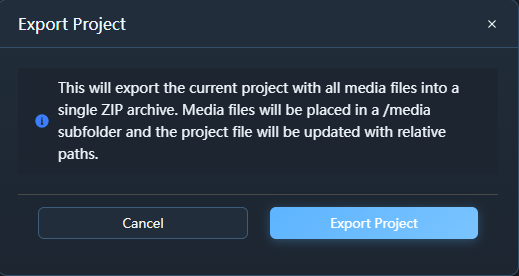
- A dialog appears showing the export status.
- Click Export Project in the dialog to start.
- Once complete, the ZIP file downloads automatically to your browser's default download location.
What Gets Exported
| Included | Not included |
|---|---|
.vpp project file (with rewritten relative paths) | Live sources (NDI, Spout, capture card — configuration is preserved) |
| All video files referenced in the project | Files that no longer exist on disk |
| All image files referenced | Temporary cache files |
| All audio files referenced |
Archive Structure
project-name-export.zip
├── project-name.vpp        ← project file with relative paths
└── media/
    ├── background_loop.mov
    ├── title_screen.png
    ├── ambient_music.wav
    ├── outro_1.mov         ← renamed automatically (collision avoidance)
└── outro_2.movAll media paths inside the .vpp file are rewritten to media/filename.ext so the project loads correctly wherever the ZIP is extracted.
Filename Collision Handling
If two media files in different folders share the same filename (e.g. intro.mov in /Shows/A/ and /Shows/B/), they are automatically renamed to intro_1.mov and intro_2.mov in the archive to avoid overwrites.
Using the Exported Project on Another Machine
- Extract the ZIP to any folder (e.g.
C:\Shows\MyShow\). - Open Exaplay 3.
- Use File → Open and navigate to the extracted
.vppfile. - All media loads from the
media/subfolder automatically — no relinking required.
Limitations
- Large projects may take time to export depending on total media size. The progress bar in the export dialog shows progress.
- Live sources (NDI, Spout, etc.) are not exported as files, only their configuration metadata.
- The export is rate-limited to 5 requests per minute for security.
Security
The export endpoint includes path-traversal protection — only files actually referenced in the project can be included. It is not possible to export arbitrary files from the server filesystem via this feature.
Troubleshooting
| Problem | Solution |
|---|---|
| Some media files missing in ZIP | Check if those files exist on disk; live sources are intentionally excluded |
| Export fails immediately | Save the project first (Ctrl+S), then retry |
| Very slow export | Normal for large media libraries; the ZIP is created in real time from disk reads |
| "Rate limit exceeded" error | Wait one minute and try again |