
Appearance
Simple Mode
Simple Mode is a toggleable display mode in the Operator Control View that makes the interface friendlier for non-technical operators by replacing technical jargon with plain language and hiding advanced configuration options.
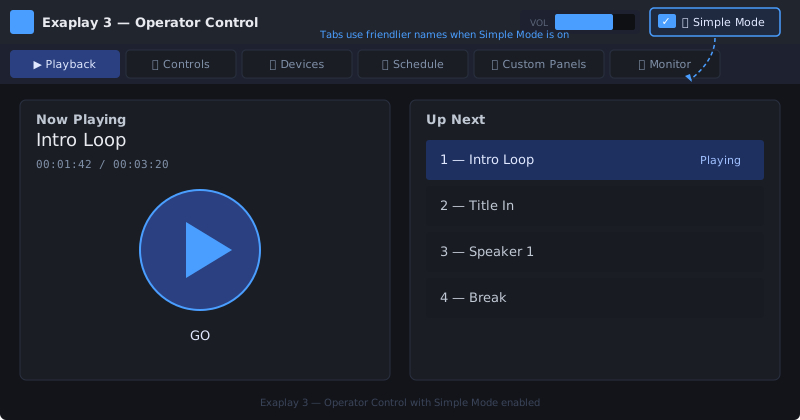
Enabling Simple Mode
In the Control View (/control), look for the 👤 Simple Mode checkbox in the top-right area of the header, next to the Master Volume control. Check it to enable; uncheck to return to Normal Mode.
Your preference is saved automatically in the browser's localStorage — it persists across page reloads and browser restarts.
What Changes in Simple Mode
Tab Name Translations
| Normal Mode | Simple Mode |
|---|---|
| Composition & Playlist | ▶️ Playback |
| Custom Control | 🎚️ Controls |
| TCP Devices | 📺 Devices |
| Scheduler | 📅 Schedule |
| User Panels | 🎨 Custom Panels |
| Monitor | 📡 Monitor |
Term Translations
| Technical term | Simple Mode equivalent |
|---|---|
| Alpha | Visibility |
| PJLink Projectors | Projectors |
| Advanced setup details | (hidden) |
| IP address / Port | (hidden after device is added) |
| Command snippet | (hidden) |
| Embed code | (hidden) |
| Generic TCP Devices section | (hidden) |
Button Tooltips
In Simple Mode, button tooltips use plain action phrases:
| Button | Normal tooltip | Simple Mode tooltip |
|---|---|---|
| ▶ | Play | Start playing |
| ⏸ | Pause | Pause playback |
| ■ | Stop | Stop and reset |
What Does NOT Change
Simple Mode is a display filter only. All functionality remains available:
- All cues can still be triggered
- All devices can still be controlled
- All schedules still run
- The project is unchanged
- Switching modes is instant and requires no save
When to Use Each Mode
Use Simple Mode when…
- You are handing the console to a non-technical stage manager or event coordinator
- You want a clean, focused interface with fewer distractions
- You are training a new operator
- The operator should not see or modify networking/API details
Stay in Normal Mode when…
- You are configuring TCP devices, external control integrations, or OSC mappings
- You need to see raw IP addresses or port numbers for troubleshooting
- You are building and testing User Panels
- You are an experienced operator comfortable with the full interface
Example
A corporate AV technician sets up the show in Normal Mode, creates cues, configures PJLink projectors and schedules. Before handing the console to the event host, they enable Simple Mode. The event host sees:
- ▶️ Playback tab with large, clearly labelled cue buttons
- 📺 Devices tab showing "Projector 1" and "Projector 2" with simple ON/OFF/SHUTTER buttons
- 📅 Schedule tab showing today's schedule
The event host has no access to advanced setup details, IP addresses, or other configuration details.
Simple Mode and User Panels
Simple Mode does not affect the User View (/user). User Panels are always shown in their configured form regardless of the Simple Mode setting.