
Appearance
Interface Overview
Exaplay 3 has three web-based views, each targeting a different role:
| View | URL path | Who uses it |
|---|---|---|
| Main Editor | / | Operator / programmer setting up the show |
| Operator Control | /control | Stage operator running the show |
| User Panel | /user | Simple remote triggering for non-technical users |
All views connect to the same playback system and share the live project state in real time.

Layout of the Main Editor
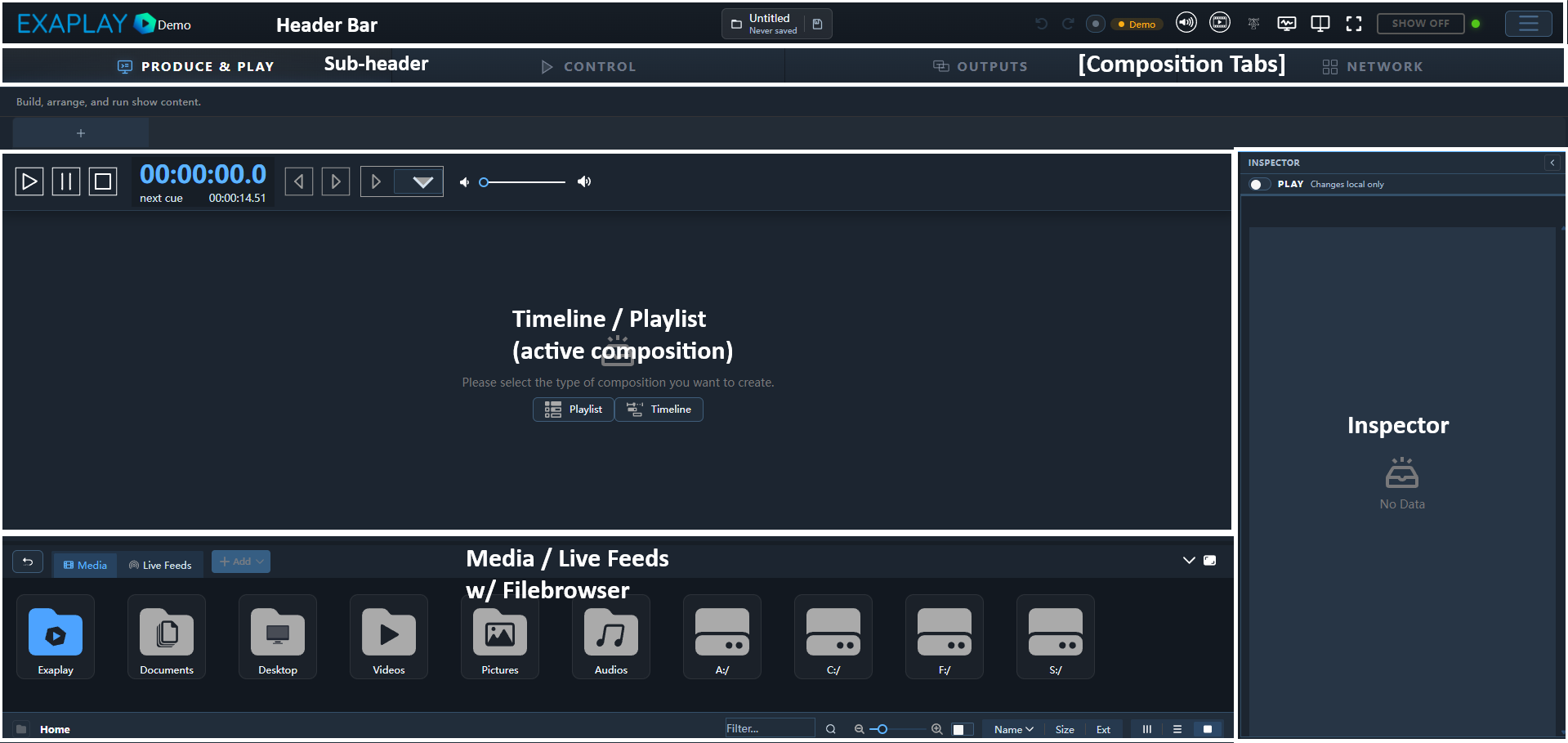
Each area is documented in its own page:
- Main Editor View — composition canvas, header toolbar
- Operator Control View — simplified show-running interface
- Inspector Panel — properties of the selected clip or layer
- File Browser — Media & Live panel at the bottom: media, live feeds, targets, visualizer tabs
- Timeline — clip arrangement, tracks, playhead
- Playlist — cue-based triggering workflow
- Custom Controls — pin Inspector parameters to the operator panel
- Output Preview — floating live preview of the engine's outputs
- Layout Designer — visual positioning of items directly on the output preview
- User Panel Builder — create custom pages for end users